Your Year-End Financial Review Checklist for Freelancers
Make the most of year-end with this comprehensive financial review checklist. Maximize deductions, plan for next year, and start fresh.

Your Year-End Financial Review Checklist
The end of the year is the perfect time to review your finances, maximize tax deductions, and set yourself up for success in the coming year. Here's your comprehensive checklist.
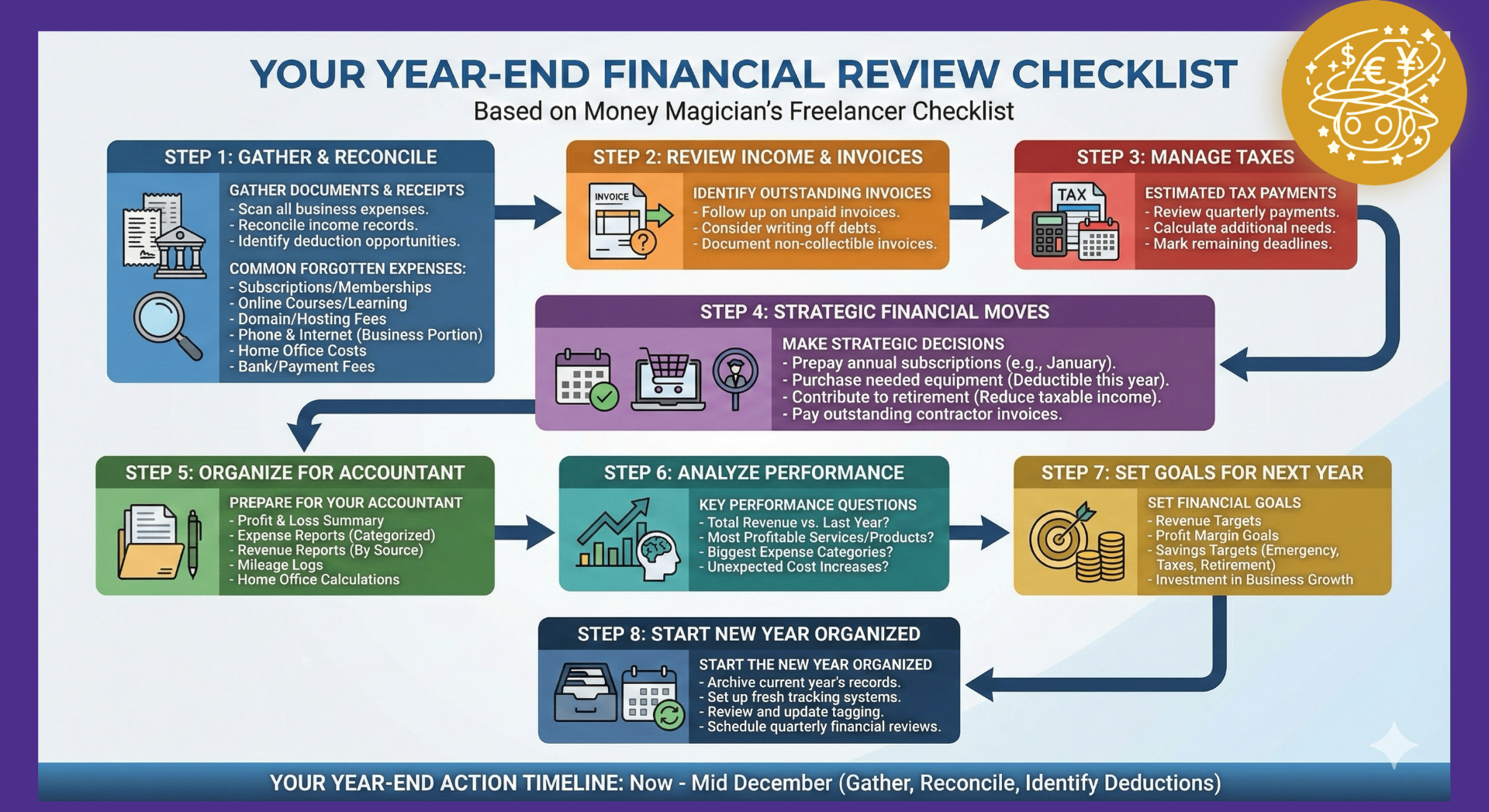
Why a Year-End Review Matters
Before the calendar flips, you have a valuable window to:
- Claim all eligible tax deductions
- Make strategic financial decisions
- Review business performance
- Set goals for the upcoming year
Part 1: Expense Review
Gather All Receipts
Now is the time to ensure every business expense is recorded. Check:
- Email inboxes for digital receipts
- Bank and credit card statements
- Payment apps (PayPal, Stripe, etc.)
- Physical receipts you've collected
Not sure how to track these effectively? Our guide on getting started with expense tracking can help.
Categorize Outstanding Expenses
Using Money Magician, scan any receipts you haven't yet recorded. Our AI automatically categorizes them for accounting purposes.Look for Missing Deductions
Common expenses freelancers forget:
- Professional subscriptions and memberships
- Online courses and learning materials
- Domain renewals and hosting fees
- Phone and internet (business portion)
- Home office expenses
- Bank and payment processing fees
Part 2: Income Reconciliation
Match Your Records
Compare your recorded income against:
- Bank deposits
- Stripe/PayPal transaction histories
- Invoices marked as paid
- Tax documents from clients or platforms (when received)
Identify Outstanding Invoices
- Follow up on unpaid invoices before year-end
- Consider if any debts should be written off
- Document any non-collectible invoices
Part 3: Tax Preparation
For a deeper dive into tax strategies, see our essential tax tips for freelancers.
Estimated Tax Payments
- Review quarterly payments made
- Calculate if additional payment is needed
- Mark deadlines for remaining payments
Maximize Deductions Before Dec 31
Strategic moves to consider:
- Prepay annual subscriptions - Pay January subscriptions now
- Purchase needed equipment - That new laptop is deductible this year
- Contribute to retirement - Pension or retirement contributions often reduce taxable income
- Pay outstanding invoices - Prepay contractors if beneficial
Organize Documents for Your Accountant
Prepare:
- Profit & Loss summary
- Expense reports by category
- Revenue reports by source
- Mileage logs (if applicable)
- Home office measurements and calculations
Part 4: Business Review
Analyze Your Year
Key questions to answer:
- What was your total revenue vs. last year?
- Which services/products were most profitable?
- What were your biggest expense categories?
- Did any costs increase unexpectedly?
Review Your Rates
Consider:
- Have your costs increased? (Adjust rates accordingly)
- Are you undercharging compared to market rates?
- Which clients/projects had the best margins?
Client Assessment
- Which clients do you want to continue working with?
- Are there clients to phase out?
- Who are your most profitable customers?
Part 5: Planning for Next Year
Set Financial Goals
- Revenue targets
- Profit margin goals
- Savings targets (emergency fund, taxes, retirement)
- Investment in business growth
Budget Planning
Based on this year's expenses, create a budget:
- Fixed costs (subscriptions, insurance, etc.)
- Variable costs (by category)
- Planned investments
- Tax set-asides (25-30% of income)
Update Your Systems
Start the new year organized:
- Archive this year's records
- Set up fresh tracking for new year
- Review and update your tagging system
- Schedule quarterly financial reviews
Your Year-End Action Timeline
Now - Mid December
- Gather and scan all receipts
- Reconcile income records
- Identify deduction opportunities
Mid December
- Make strategic purchases/payments
- Follow up on outstanding invoices
- Review retirement contribution options and limits
Late December
- Final receipt capture
- Generate year-end reports
- Back up all financial data
Early January
- Compile documents for tax filing
- Set up tracking for new year
- Schedule time for Q1 planning
How Money Magician Helps
Money Magician makes year-end review painless:
- Scan receipts instantly - AI extracts all transaction details
- Export reports - Generate categorized expense reports for your accountant
- Track revenue - With Stripe integration, see all income automatically
- View insights - Understand spending patterns and profitability
- Stay organized - All receipts stored securely in one place
Start Your Review Today
Don't wait until December 31st! Start your year-end review now and give yourself time to make strategic decisions before the deadline.
Log in to Money Magician and generate your year-end expense report in minutes.
Disclaimer: This article provides general information and should not be considered professional tax or financial advice. Consult with qualified professionals for advice specific to your situation.
Frequently Asked Questions
How can Money Magician help with my year-end expense review?
Money Magician's AI-powered receipt scanning lets you quickly capture any missing receipts, automatically categorizes expenses for accounting, and generates exportable reports organized by category for your accountant.
Can I export my expense data for tax filing?
Yes! You can export your expenses as CSV or PDF reports, filtered by date range and category. These reports are formatted for easy sharing with accountants and tax professionals.
Does Money Magician support tracking business expenses across multiple currencies?
Absolutely! Money Magician supports 85+ currencies, perfect for freelancers and digital nomads who earn and spend in different currencies throughout the year.
How does Money Magician handle tax-deductible expense categories?
Our AI automatically assigns accounting categories to expenses when you scan receipts. You can also add custom tags to group expenses by project, client, or deduction type for easy year-end organization.